We’ve all done it. We’ve all searched for something online and clicked the first thing to pop up only to find ourselves staring at ads, pop-ups, a non-working website, the completely wrong thing, or something that looks almost right but it isn’t. I have been right next to people who do an online search and immediately click on the first thing that pops up only to hear them exclaim that it doesn’t look like it should. Sometimes slowing down is the first step when looking for information online. An old quote is, “An ounce of prevention is worth a pound of cure” (Merriam-Webster, 2025). When I’m searching online, I always take a moment to evaluate the search results that I get.
Let’s begin by looking at the website address itself before you even click on the link. The first thing I would do is look at what is called the extension (University of Iowa, 2024). This is the end of the main website address and includes the following:
- .com (commercial use)
- .gov (government use – specifically restricted for this purpose)
- .edu (education/school use)
- .org (individual and organizational use)
- .net (network provider use)
The above are the most common endings that you will find, but you can visit The University of Iowa’s Information Technology article to see information about each of these extensions and extensions for other countries.
It is important to select the legitimate website for an organization, government agency, school, or company. Many companies own the rights to the website address that matches the exact company name such as Walmart.com, Amazon.com, or HomeDepot.com. Banks and financial services companies will do the same. Be certain that you know the exact address for a company before doing any kind of transaction with the website, and it’s a good idea to bookmark that address so you don’t have to search for it each time when you are online. On your phone, you will probably be using the app, but make certain it’s the legitimate app for the company.
Take a look at this image below:
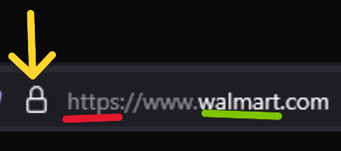
When you look at a website address for large companies, look for these things. First, is there a lock symbol indicating that the page is secure? Second, does the website address begin with “https” also indicating that the information is secure? Finally, are things spelled correctly?
If you plan on doing any business/financial transaction through a website, the lock symbol means that the page is secure, and if you click on the lock icon, it will even tell you which company has verified it is secure. The “https” prefix means that information is being sent securely (Cloudflare, 2025). Not every website will have this level of security. Make certain before doing a transaction or entering personal information that this is a website you can trust. Lastly, keep in mind that dishonest persons will often not be concerned about the spelling, and they will use minor spelling flaws to get you to click on a counterfeit website address. If a page doesn’t look right, just close out of it and search again. It’s better to be safe.
Keep in mind that some small businesses may not have their own website. They may use a Facebook page instead. If you want to shop online with a small business, make certain they have security features on their website as well. Another handy feature for small companies is an “About Us” page that will explain more about the company.
Ultimately, it’s up to us to figure out if a website is legitimate. If you aren’t sure if you’re looking at a legitimate website, do a little investigating. If you are looking for a government agency, the website should end in a .gov extension, and you should be wary of any page claiming to be a government site ending in any other extension. If you are looking for a university/college website, it should end in a .edu extension. Do a search for the business, agency, school, or company and see what results you find. I use a free basic online tool known as VirusTotal to check a website address when I’m uncertain about clicking on it. Search the Better Business Bureau, and check out their article on spotting a fake website. A little bit of homework can save us a lot of headaches.
Finally, if you are in any doubt about a website, just close out of it and consider doing business in person until you feel more comfortable with a company’s website. Scammers trying to use information from a legitimate company don’t care about hurting us, and the real companies can’t fix things for us if we fall for a fake website. It’s up to us to take care of ourselves when we are online. When you aren’t certain about a site, take a little extra time to investigate and be certain it’s what you are truly looking for. You won’t regret it.
References:
“An ounce of prevention is worth a pound of cure.” (2025). Merriam-Webster Dictionary. Accessed February 28, 2025. https://www.merriam-webster.com/dictionary/an%20ounce%20of%20prevention%20is%20worth%20a%20pound%20of%20cure
“Understanding website names – what the three-letter extensions mean.” (2024). University of Iowa Information Technology Services. Accessed February 27, 2025. https://its.uiowa.edu/services/phishing-and-anti-spam-efforts/understanding-website-names-what-three-letter-extensions
“What is HTTPS?”. (2025). Cloudflare. Accessed February 28, 2025. https://www.cloudflare.com/learning/ssl/what-is-https/
VirusTotal: https://www.virustotal.com/gui/home/url
Better Business Bureau: https://www.bbb.org/
“BBB Tip: How to identify a fake website”. (2025). Better Business Bureau. Accessed February 28, 2025. https://www.bbb.org/all/spot-a-scam/how-to-identify-a-fake-website
~ ~ ~ ~ ~ ~ ~ ~ ~ ~ ~ ~ ~ ~ ~ ~ ~ ~ ~ ~ ~ ~ ~ ~ ~
And you shall know the truth, and the truth shall make you free. (John 8:32, NKJV)
 All Things Subject to Change